Crop mark
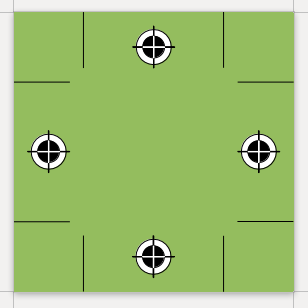
Crop mark drawing program for ODF and PDF documents
latest release: 2024-03-19 23:26:28
Description
Crop mark drawing Logo program for ODF and PDF documents
Usage in LibreOffice 4.0
1. Open cropmark.odt and set the requested page size
2. Click on the Start icon of the (View » Toolbars ») Logo toolbar
3. Insert the result (a single shape group) into the master page of your drawing, presentation, or into the header or the footer of your text document. If you don’t want to modify all page styles of a complex text document, you can add crop marks to a PDF document with different PDF tools, eg. pdftk.:
1. Export the first page with crop marks to a PDF file (your_cropmark.pdf)
2. Join it with your PDF document (your_document.pdf) in the command line:
pdftk your_document.pdf multistamp your_cropmark.pdf output result.pdf
NOTE: you can also set PDF cropping values with GhostScript for printing:
1. Create a plain text file with the right cropping values (eg. this is 5mm crop of A4):
[/CropBox [14.17 14.17 581.1 827.72] /PAGES pdfmark
2. Convert your_document.pdf using the previous file (pdfmark.txt):
gs -q -dNOPAUSE -dBATCH -sDEVICE=pdfwrite -sOutputFile=result.pdf $OPTIONS -c .setpdfwrite -f your_document.pdf pdfmark.txt
NOTE II: optional color conversion of RGB PDF output of LibreOffice with GhostScript:
# CMYK
gs -q -dNOPAUSE -dBATCH -sDEVICE=pdfwrite -sColorConversionStrategy=CMYK -sDEVICE=pdfwrite -sOutputFile=result_cmyk.pdf -dProcessColorModel=/DeviceCMYK -dCompatibilityLevel=1.4 your_document.pdf
# grayscale
gs -q -dNOPAUSE -dBATCH -sDEVICE=pdfwrite -sColorConversionStrategy=Gray -sDEVICE=pdfwrite -sOutputFile=result_gray.pdf -dProcessColorModel=/DeviceGray -dCompatibilityLevel=1.4 your_document.pdf
Release List
– fix precision: don’t round lengths and distances in pt
– fix visibility: white fillcolor of the larger circles instead of full transparency
Download 1.0 Initial release 4.0 BSD Download
★ ★ ★ ☆ ☆
Post your review
You cannot post reviews until you have logged in. Login Here.
Reviews
x Y Aug 9, 2021, 12:32 AM (3 years ago)
★ ★ ★ ☆ ☆
I have been trying to use the Crop Mark extension
I have been following these (slightly annotated) instructions.
Usage in LibreOffice 4.0 (Actually 7.1.2.2)
1. Download and open cropmark.odt and set the requested page size (plus bleed area required)
2a. Click on View » Toolbars » Logo to add Logo tools to standard toolbar
2b. Click on the Start icon (circle with a play button icon inside) of the Logo toolbar section
3. Insert the result (a single shape group) into the master page of your drawing, presentation, or into the header or the footer of your text document.
I go wrong on step 3.
I go to the Side bar Deck » Page » Header of my text document
and click on the tick box and make sure that Same Content is set to All Pages
I then select and copy the shape group from cropmark.odt and paste it into my Header area of page 1 of my text document.
The crop marks appear in Page 1.
If I then create a second page by Insert Page Break, there are no crop marks.
No one has commented on this page yet.
RSS feed for reviews on this page | RSS feed for all reviews